
Advantages
- No aiming required, intuitive input: A "3D Gesture Input" method, in which users trace across the keys with the VR controller in a single continuous stroke, makes text entry easy even for users with hand tremor, VR beginners, and children.
- Reduced fatigue: Keys are arranged on a curved surface concave toward the user, so all keys can be reached with a natural rotation of the arm, reducing strain even during extended use.
- No dedicated hardware required: The system works with standard VR controllers, eliminating the need for additional hardware costs.
A demonstration video showing how the system works is available below.
https://www.youtube.com/watch?v=MOcTrl_Ik8E
Background and Technology
Text entry in VR (virtual reality) applications is typically performed by using a laser pointer (ray) to select characters one at a time from a virtual keyboard floating in mid-air. However, this method is time-consuming. Moreover, because it requires continuously aiming at small targets in mid-air, it has been difficult for users prone to hand tremor, users unfamiliar with VR devices, and children to use.
This technology is a new text-entry interface developed to address this challenge, with two key features: (1) a "Spherical Keyboard," in which the virtual keyboard is arranged on a sphere centered on the user, and (2) "3D Gesture Input," in which characters are entered by moving the controller as if tracing across the keyboard. Text entry is completed in the following three steps.
- Step 1: The Spherical Keyboard is displayed in the VR space.
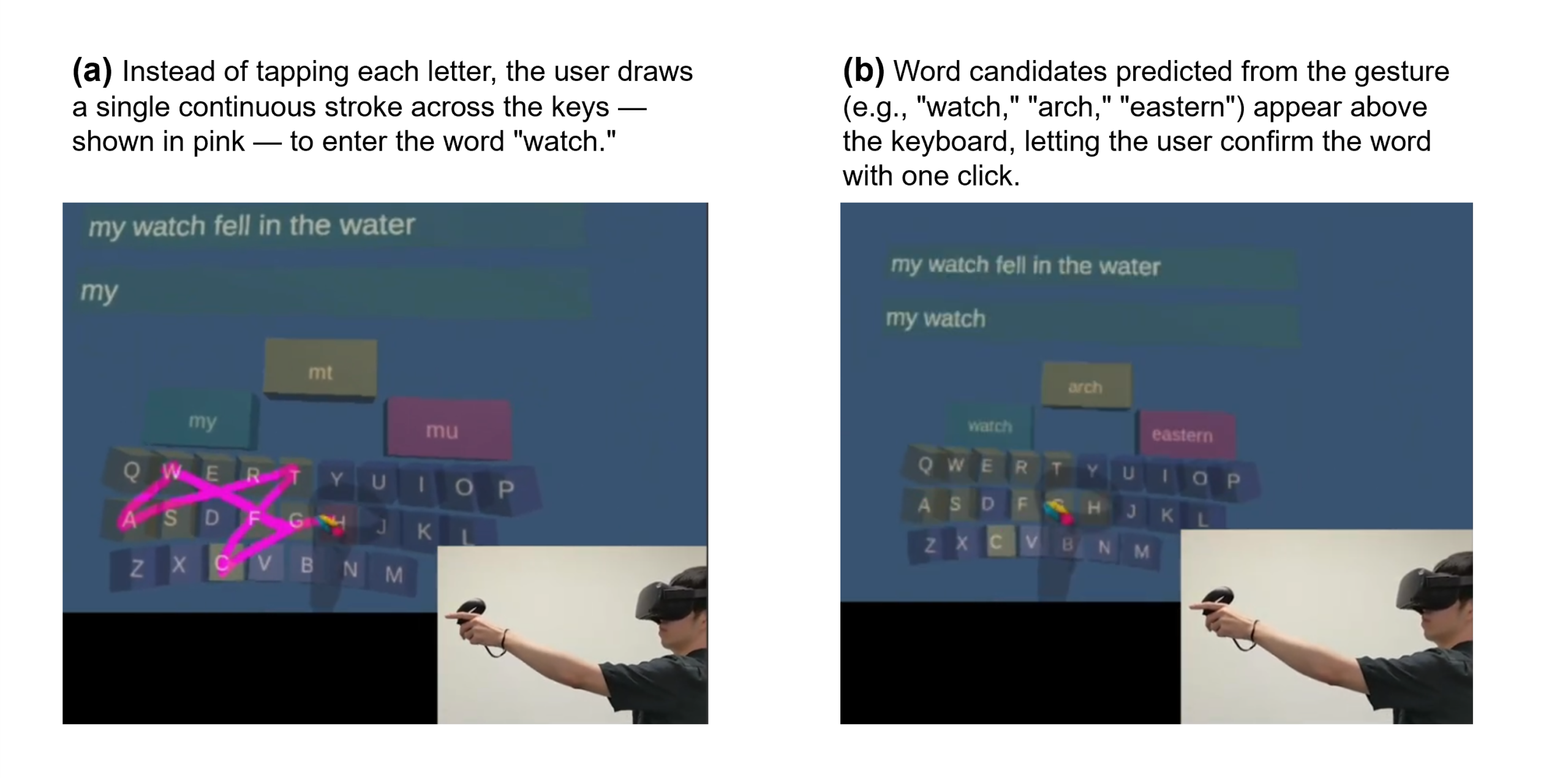
- Step 2: The user moves the controller to trace across the keys of the Spherical Keyboard, entering characters in a single continuous stroke (see figure (a) below).
- Step 3: The user selects the correct word from the predictive-text candidates displayed in the VR space to finalize the input (see figure (b) below).
The "Spherical Keyboard" arranges the virtual keyboard's keys on a sphere centered on the user. On a conventional flat keyboard layout, keys located farther from the center are viewed at more of an angle and appear smaller, requiring fine adjustments to aim the ray accurately—which tends to increase fatigue and input errors. The Spherical Keyboard overcomes this drawback: because peripheral keys are displayed at the same apparent size as those at the center, they are easier to aim at, which is expected to reduce input errors and allow for a more compact keyboard UI. It is also expected to reduce fatigue, since it requires less wrist and elbow rotation than a flat keyboard.
"3D Gesture Input" is a method of entering text by tracing across the keyboard with the hand holding the controller. It can be described as a 3D VR counterpart to "swipe typing" (also known as glide typing) found on smartphone keyboards. Unlike conventional methods that operate the ray using only the wrist and fingertips, this method uses movement of the elbow and arm, so it does not require fine hand control. This is what makes it accessible even to users who would otherwise struggle with the ray-based approach described earlier.
On the other hand, the larger range of body movement raises concerns that it could increase fatigue. To address this, the technology incorporates a predictive-text feature: while the user performs the gesture input, the system predicts words from the controller's trajectory and displays candidates in the VR space. Because the user can finalize a word simply by selecting a candidate with a controller button—before typing out every character—the physical strain is expected to be reduced.
Current Stage and Key Data
Partnaring Model
The University of Tsukuba is seeking VR software/content development companies, as well as companies operating VR-based businesses and services, that are interested in the practical application or joint development of this technology.
This technology is not limited to accessibility-focused VR applications such as education and welfare/nursing care—it can serve as a universal text-entry interface open to all users. We encourage you to consider incorporating it into the VR content your company develops and provides.
We welcome joint research and development partners who can work with us toward practical implementation, including expanding to additional keyboard layouts such as Japanese, further optimizing the algorithm, and conducting demonstration experiments.
Principal Investigator
Buntaro Shizuki, Professor (Institute of Systems and Information Engineering, University of Tsukuba)
Patents and Publications
Japanese Patent No. 7442783